Showing posts with label Tracking in a Filofax. Show all posts

Friday, 30 June 2017

Goals

One of my monthly goals is to de-clutter as much as I can and I''m purging up to 5 things each week. It's the books' turn as I have too many and quite a few most I haven't opened for a long time.


Five plus have left the shelf and will be off to the Charity Shop. The others I shall 'test out' so my trusty Filofax has come in handy for monitoring the testing and chucking procedure. This task will fit in well with menu-planning.


My next aim will be to sell some items so a LIST is in order now, I think.

Happy planning.

Sunday, 8 January 2017

Fiercely Functional Filofax Setup for 2017

No fancy stickers here, no fancy writing - I've finally found that I'm fiercely functional with my everyday planning. This year I initially chose the Pear Filofax Original for my everyday planner but, not wanting to spoil its newness I settled for my Lime Piazza instead. It's been used before, feels good and is a fresh green colour to start the New Year.


There's nothing in the inside pockets so what greets me when I open up is this puss cat pic behind which is my year at a glance.


The pages in my planner are the standard Filofax ones but I've divided them up with monthly dividers which I used last year.


Straight after the divider is a monthly 2 page spread. On the left - just a list of all the dates in the month. Here I note down birthdays, anniversaries and appointments. On the right I write more personal jottings  that happened on certain days. The reason for this is that I intend to archive the monthly pages only so notable happenings need to be logged. e.g. car broke down - towed home.


A week on 2 pages follows the monthly spread where I schedule To Dos for the week in the first box and To Dos for specific days in the day boxes. Between the 2 pages for the week is a running To Do list which is easily detachable for moving on to the next week. If I have time and inclination I can pull off a job from this list.


Following the list is another 2 page spread - this time my activity tracker listing household cleaning areas, hobbies I pursue, habits I wish to log and goals I wish to achieve.


The other half of the week can be seen when this tracker is turned over. This tracker, like the Master To  Do List is easily moved from one week to the other. Behind the weekly pages is a moveable lined card which I put in to keep my scrawly writing in straight lines. It's 'nearly' working!


That's it - that's all, as the other 11 months follow exactly the same layout. This planner stays at home and is updated every evening. I used this layout last year and it worked very well. My spending is logged elsewhere. 

Happy Planning

Wednesday, 19 October 2016

Filofax Kitchen Cupboard Project

I keep a list in the kitchen to note down things to buy as and when I run out. This then becomes my next shopping list. I wanted to go one step further in my list making in order to streamline and optimise the items that I keep in the cupboards and to keep me informed of next purchases ahead of time.

My first step was to produce a Master Grocery List of all the foodstuffs and non-foodstuffs in the kitchen cupboards. From that I wanted to only store the optimum number of each item. e.g. always have one full roll of tin foil for when the one in use runs out or always have 6 tins of tomatoes in the cupboard to last until the next shopping day (We like tinned tomatoes!). I downloaded a sample Master Grocery List and then set about an audit of the kitchen cupboards to see what was in use.


Roughly filling in the Master List gave me an idea of how much of a page I needed to use for each Category. My first task now will be to log what I have so far and work out how many of each item I need to store in the cupboard to last me until the next shopping trip.

Eventually I hope to be able to work out meal plans, freezer rotation and items for the shopping list. I should always know what's in my cupboards and what items need to be used up before their sell by date. Calling this a project gives me a use for these project pages that came with my Westfalia.


I don't know what my system will turn out to be yet but I hope it will eventually work itself out for me. Meanwhile so far ...

Filofax Food Project

Aim:- to streamline grocery shopping, food auditing and meal planning

Plan

* audit cupboards, fridge and freezer
* download Master Grocery List
* Fill in list
*Design own list
*Make pages
*Fill in customised pages
*Trial and review
*Use up superfluous items
*Optimise cupboard contents
*Trial and review
Design in change of routine
*Finalise design pages
*Laminate if needed

Happy Planning


Saturday, 18 June 2016

Systems in a Filofax

My Filofaxes enable me to put various systems into operation, systems that help in the smooth running of my life. Having, or devising a system to help or overcome a problem allows some form of control to take place so relieving stress and worry about how to cope. The following systems are used in my planning and organising. By clicking on the relevant side labels more information can be found about my systems.

1. GTD - Most people like to Get Things Done and out of the way and then they can relax. 
My GTD system is in my pocket Malden.


2. Tracking - A greater insight into the whys, wherefores and whens can be gained with tracking. I have tracked, am tracking or am forming a tracking system for the following:-
a. Habits eg. Am I drinking enough water? Why do I sometime have Restless Legs? Am I eating enough fruit and veg?
b. Targets eg. Have I reached my goal weight? I'd like to finish my current crochet project by the end of the month. I'd like all the fences painted by the end of Spring.
c. Tasks - eg. Are we keeping up with the housework and gardening? When do the potatoes have to be harvested?
d. Finance eg. Am I overspending? How much do I have left in the food budget? What's my average spend on food per month?
My tracking is found in my personal Malden, my mini Malden and my A-Z Microfile


3. Recording information eg. Addresses, Birthdays, Car information
My recording of information is found in my personal Malden, my A5 Originals, my Travel Planner and my A-Z Microfile.


4. Appointments e.g. Doctor's, Dentist's, visits
My appointments are in my personal Malden.


Happy Planning

Saturday, 4 June 2016

Habit Tracking

I use a few systems in my Filofax to help me make and track habits. One of the first habits I wanted to make sure I was doing was drinking enough water throughout the day. Many people put a water tracker on their daily page, which consists of an outline of 8 glasses or just a rectangle of 8 squares, and then colour in a square or glass for each 250ml of water drunk that day. By the end of the day the recommended 2 litres of water should have been consumed. Easy to tell when all the squares are coloured. Once I knew that I was regularly colouring in 8 squares I saw no need to track this habit as it had become part of my day - no point in tracking what I was already doing.

Setting up a cleaning system in my organiser enabled me to tidy and clean all areas of my home and then keep them that way. Once this habit of cleaning and tidying was regular then the prompts in my diary did not need to be there. Habit learned and in progress so no need to record anything. (My first cleaning system can be seen here.)

At the moment I'm trying to lose a little weight so again a system has been set up in my mini Filofax to enable me to get into the habit of eating to lose weight. Once the required weight has been achieved I shall alter this system so that I maintain that weight and don't go over. Again when all this becomes a regular habit I shall have no need to record any information and that tracking will cease. (Please click on the 'diet and weightless planner' label for more information.)

So my Filofaxes are used to help me form a habit, maintain a habit and then the tracking stops. (Please click on the 'tracking' label for more information.)

Monday, 9 May 2016

Mini Malden in Ochre

This new to me mini Malden has started its organiser life as a diet and weight tracker. I aim to lose some weight and this baby is going to help me.


The first section shows which weight range I should be in for my height. I'm only a little overweight but I aim to be in the middle of the healthy band.


After that I aim to have my own graph charting, hopefully, a downward trend in my weight. The weigh-in will be weekly. Any upturn will influence my future goals. At the moment it is eat fruit for afters, no biscuits, chocolate or any calorie laden food and no alcohol.


Next section houses any recipes that I come across on my Internet travels which will help me fulfil my goal.


In order to make the ideal meals I need a list to remind me to shop for the right ingredients.


Finally the last section houses a pull out week on which ...


I can record my meals. From this I can set myself the next week's goals and tell myself off if I fail to keep on track.


I also have in there somewhere a body measurement chart (waist, thigh, arm, hips etc) which will graphically show my changing body shape!!!!! 

Another incentive is a page promising me small treats or presents if my weight loss stays on track. My first 5 lb loss will give me permission to buy some coloured Pilot Frixion pens. It's early days yet but I aim to get there.

Happy Planning


Monday, 28 March 2016

Personal Malden update

I've transferred my diary to the new Personal Malden in ochre just to use up the Filofax pages that came with it. I think I prefer my own design of page but I'm not going to waste these Cotton Cream ones.


I've added a dingle dangle just for decoration - it's an old ear-ring of DD's. The brown base matches the brown of the Malden.


No dividers are decorated as I thought I'd use this planner as/is.


Behind number 1 is the year at a glance. I can soon mark of March - how quickly the months go.


There are the monthly pages behind which are just 'use up' pages from another planner. I've found the list view quite adequate for my needs. I'll keep all these monthly pages and chuck the dailies so I make sure I mark in any important things that have happened at the end of the day.


Also in this Months section is a tracker of my spends in various shops. I've some space left so I may track other things as well. I know I'm drinking enough water so I don't need to track that. Any habits I want to get into I shall note down here and the first one is going to be - no chocolate tracking!


Behind tab 2 ...


is a To Do! Again this page is a re-use of an old diary page with the days crossed out with tape.


This master To Do List can be fed into any of the days on the following pages. I've enough space to write on these Week on Two Pages so I don't really need a daily page. I was finding that I was just writing for the sake of filling up the spaces on the other pages. This way I'm not wasting paper.


The other sections are not in use at the moment. Other information and planning is stored elsewhere.


I've sold one planner (the Hamilton) and am in the process of selling my Personal Classic Cross (which was my first Filofax and recently housed my Christmas planning) and Pocket Cross Filofaxes. They have to make room for (and pay for) an A5 that I just had to have.

A change is as good as a rest.

Happy Planning

Tuesday, 8 March 2016

Month, Week, Day pages for Filofax

These bargain Weekly To Do sheets have really set me off on trying to design the ideal working set-up for me. I primarily don't want to waste paper, I want to write down only things that are relevant to me and I want the whole process of using my Filofax to be easy and enjoyable.

Idea 1 - use half sheets of A4 paper as a fold out. I sketched (scribbled) out a rough design on some old printed paper - section for day notes at the top left, to do's bottom left and a section for tasks on the right. There's plenty of room to record other things so I know this size of paper would be OK.


Folded over the back could be used for a notes section.


Idea 2 - Put a daily tasks section on the bargain pages and use their notes section as an At A Glance view of the week with dates to the left. Here I've filled in an Ebay watch, a pick up pills day, a funeral and a birthday. Plenty of room. The tasks section has the letters of the days of the week so I can fill in which tasks I've completed. Again there's plenty of room still on this section so I used the bottom of the page for some lettering practice.


My week's going well so far with this set-up. I've put some To Do's (There really shouldn't be an apostrophe there, should there?) To Dos? To Does? (No, that's not right either!) These 'I'd like to get these done' tasks can be done on any day of the week so there's no particular urgency to any of them. Filling up nicely now!

Can you see the water intake column?

The back side of the page I used for notes - in this case a recipe and some language homework.


The page then reminded me of some examples of organiser pages I've seen on the Internet where things pull out all over the place so …

Idea 3 - on the back of my bargain page why not have a monthly planner on a side that's coming up to a new month. This can then open out and be seen with the weekly planner. Hey, hey, hey! In the spare space I put a Monthly To Do heading so 'goals for the month' can be listed.
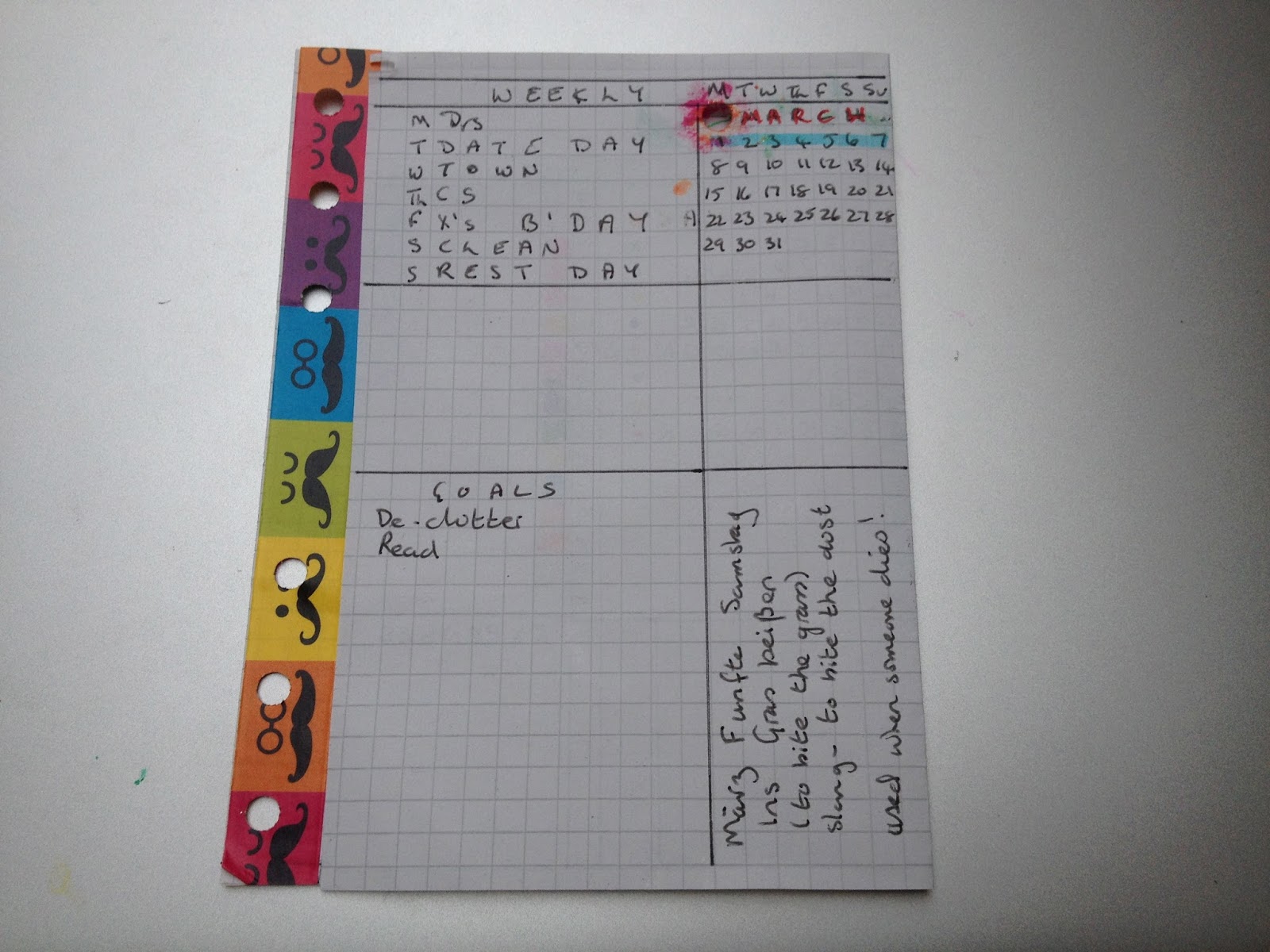

Idea 4 - let's try out a version of my own. This time I chose squared paper pulled out of a notebook. I could now utilise all the space as it has no borders. For my 'decoration' I put some tape down one side and attempted to draw a pretty flower at the top.

Top left is the week number and some spaces for days. By the side of these spaces I could colour in my water intake (All good planners seem to want to monitor their water intake.) I could fit in a space for Tasks with a colour coding system and with a timing system by the side on the left. At the bottom there's plenty of room for other headings. I've fitted in expenses in the bottom right.


On the back I've got a weekly At a Glance, a Weekly Review and more spaces for monitoring, tracking or listing.  Oh, wait a minute, I'll just open it out.


Sorry the pic's a different colour, I've just taken it now.


Idea 5 - The streamlined version. After further study of Weekly Pages I tried a simple, no frills version. Here the days go all the way across the page - I've not sectioned anything off yet. At the bottom will be some more spaces for appointments, dates and To Do's. The labels can be changed or added to - whatever I wish each week.


On the back, of course, there's acres more space for more headings.


These fold out pages lend themselves to endless uses. For now, I'll use up my Bargain Weekly pages from Home Bargains and tailor them to suit my needs each week.

Happy Planning!